

Tronitech
Celebrating 45 years of excellence

ImpactMD/ Touchchart conversion

Migration of all critical data off this legacy software with the essential proprietary utilities needed.

Get Managed Document Services

800-582-7652 | [email protected]

Contact us to get started

We deliver software that solves problems. Take the first step.

This field is for validation purposes and should be left unchanged.

ImpactMD/ Touchchart conversion2024-08-29T12:50:54+00:00

Touchchart/ImpactMD meets HIPAA standards.

Data migration without the PAIN and has never been so easy.
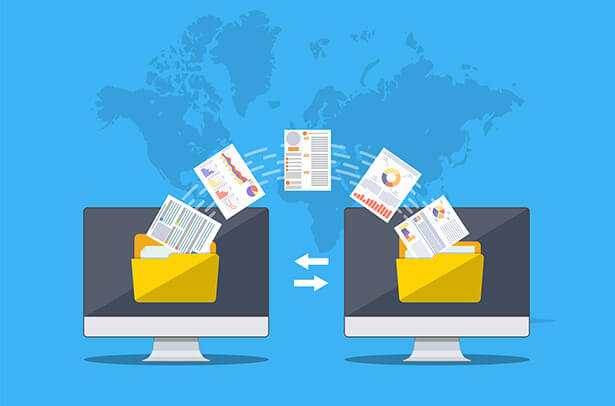
Data Migration

Touch Chart/ImpactMD, unfortunately, is no longer receiving support, leaving you with limited options. Chances are that your server is either outdated or experiencing issues. If you’ve already transitioned to a new Electronic Health Record (EHR) system and are considering migrating your Touch Chart/Impact MD EHR Document Management System to a certified and compliant EMR system, there are crucial steps to take.

The first and foremost task is to convert various types of data, including images, annotations, forms, legacy information, and database records, which may exist in a multitude of formats.

This data must be transformed into the necessary file types and database structures compatible with your chosen EMR or file storage system. Successfully migrating your existing data is pivotal, as it eliminates the primary obstacle to adopting a more suitable system.

Given that cost and accountability are paramount concerns, Tronitech has perfected a turn key solution that specialize in Touch Chart/Impact MD conversions. Tronitech can provide you with a timely, cost-effective, and tailored solution. Here are some essential steps to follow:

  • Database Analysis: Begin by thoroughly analyzing your existing database. This step involves assessing the data’s volume, structure, and complexity. Understanding the scope of your data is crucial to planning a successful migration.
  • Scope of Work: Tronitech will create a detailed scope of work document that outlines all the data and components within your Touch Chart/Impact MD system that need to be migrated. This should include a comprehensive inventory of images, annotations, forms, legacy records, and database tables.
  • Flat-Rate Pricing: After an analyzation of data, Tronitech will provide a transparent and fixed flat-rate price for the entire migration process. This ensures you have a clear understanding of the costs involved, preventing any surprises down the road.
  • Test Data: Before committing to the full migration, Tronitech will create a test environment. This allows you to verify that the data migration process works smoothly and that the converted data is accurate and complete.

By following these steps and collaborating with Tronitech for Touch Chart/Impact MD conversions, you can make a seamless transition to a certified and compliant EMR system. This process not only safeguards your valuable patient data but also sets the stage for a more efficient and cost-effective healthcare management solution.

Touchchart/ImpactMD meets HIPAA standards

Touch Chart/Impact MD is a leading data migration software to tackle complex data migration scenarios. With a cost effective, streamlined, secure and easy Touch Chart/Impact MD conversion process, your health organization can freely switch EHR software to meet meaningful use, compliance or just to get data off the EHR software in a universal format to use on any drive.

ImpactMD/Touchchart Data Conversion process
Touchchart-Data-Conversion

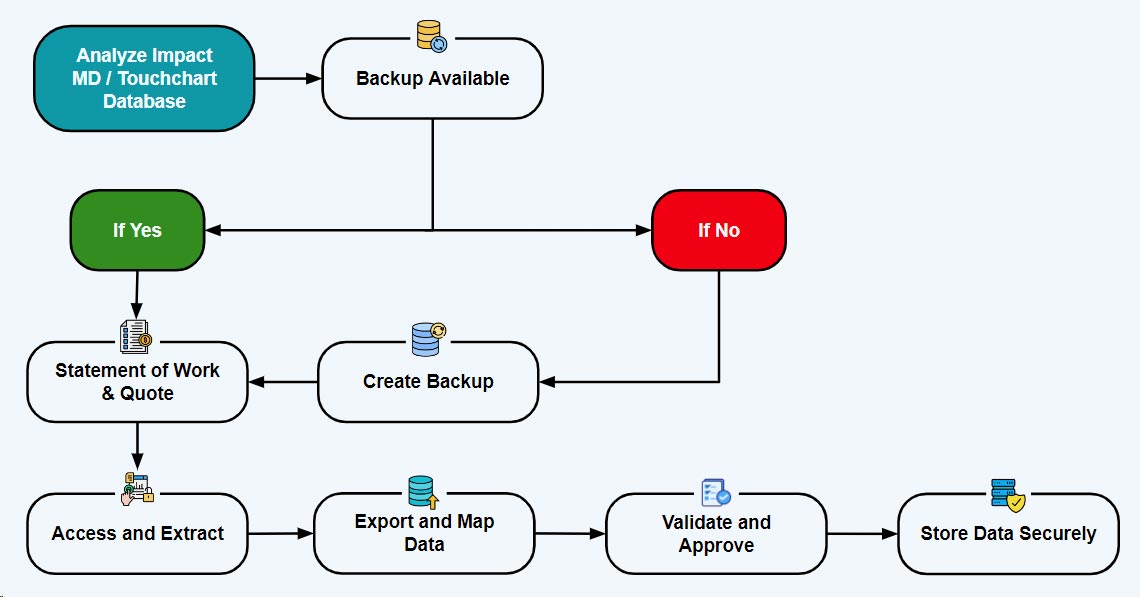
Tronitech will analyze the Impact MD/Touchchart database to determine the size, file cabinets, indexing information and any forms or annotations used. Once this is complete, Tronitech will provide a Statement of Work along with a quote based on the information gathered usually from the most recent backup. If a backup has not been done, we highly recommend doing this ASAP as depending on the age of the server, it could be very unstable. Tronitech can perform the conversion process remotely, on a customer’s server or an encrypted hard drive can be sent to Tronitech. Impact MD/Touchchart due to its age, is stored as proprietary data meaning you will need a specific export utility to convert to a universal format. Utilizing this module, all data is exported and put in the desired format securely and accurately. The most requested format is pdf with a Windows-style structure. We ensure the accuracy and all data through a thorough review of the completed export. Having patient data held securely and safely is our top priority at Tronitech. Only the person/s doing the conversion can access the data on a server that is only used for this purpose.

Frequently Asked Questions

What is ImpactMD/Touchchart conversion?2024-08-29T12:12:02+00:00

ImpactMD/Touchchart is a document management type of EMR utilized in the early 2000’s until it was sunsetted in 2012, shortly after Allscripts purchased the software. It was very user friendly and most did not want to abandon the software and continued to use. Unfortunately, the software and SSQL now are outdated, unsupported and the software is very unstable which a crash or glitch could render all the data useless and unrecoverable. Tronitech specializes in exporting this data into a universal format to be put on a drive, into another software or store on a network enabled environment. The software was utilized as both a practice management and health record meaning generally there is patient data along with health record information.

Why do I need to convert from ImpactMD/Touchchart?2024-08-29T12:12:35+00:00

ImpactMD/Touchchart has not been supported since 2012. The software was well liked and a very good software at the time. Unfortunately support was no longer available and a version of SQL is out of date along with unsupported. This makes the data stored in the software very unstable and is in jeopardy of being unrecoverable. Impact MD/Touchchart was offered before Electronic Health Records were available and widely used. With the advent of EHR’s and not being supported, Impact MD/Touchchart is not a reliable nor stable software to have health information safely stored.

What types of data are included in the conversion?2024-08-29T12:07:15+00:00

Impact Md/Touchchart was utilized for most of all the health providers information including both administration and Health information. All this data is stored in file cabinets which could range from a few to a lot. These file cabinets could contain Registration, EOBS, Invoices to Hipaa releases, prescriptions, consult notes, x-rays, general surgery, etc. This software was used for the whole practice in most scenarios.

How does Tronitech ensure the accuracy of the data migration?2024-08-29T12:07:48+00:00

Tronitech guarantees and ensures the accuracy of the data migration with a rigorous review of the exported data and checks the indexing information that matches the metrics after analyzing. In fact, we usually find orphan/dummy files as well. Out of all the conversions completed to date, there has not been one patient unaccounted for by a practice, hospital or surgery center. Tronitech has successfully completed Impactmd/Touchchart conversion for IU Medical to Tri-Valley gastroenterology with two providers. Regardless of the size, you are safe, secure and accuracy guaranteed.

Is the conversion process compliant with HIPAA standards?2024-08-29T12:08:23+00:00

Yes and Tronitech goes beyond most measures. We are HIPAA certified and all computers, drives, servers and transfers are encrypted and password-protected with multi-factor authentication.

How long does the conversion process take?2024-08-29T12:08:47+00:00

The process timeline is based on the volume of data, the number of forms and annotations, and the customer’s cooperation. In most cases, Tronitech can complete the conversion process in two weeks. However, if the customer wants all the annotations and they are part of the health record, this could take longer due to the need to burn them to an image.

What happens if there are issues during the migration process?2024-08-29T12:09:15+00:00

Issues rarely present themselves, but if they do, we contact the customer right away and resolve them. This is a very straightforward process, but communication is paramount, and working with the customer before, during, and after the conversion is essential to a successful project.

Go to Top